checking for libmemcached location... configure: error: memcached support requires libmemcached. Use --with-libmemcached-dir=<DIR> to specify the prefix where libmemcached headers and library are located ERROR: `/var/tmp/memcached/configure --with-libmemcached-dir=no' failed
checking for the location of zlib... configure: error: memcache support requires ZLIB. Use --with-zlib-dir=<DIR> to specify prefix where ZLIB include and library are located ERROR: `/var/tmp/memcache/configure --enable-memcache-session=No' failed
[root@lnmp lnmp.cn]# cd /usr/local/src/php-7.0.8/ext/
[root@lnmp ext]# git clone https://github.com/php-memcached-dev/php-memcached memcached
[root@lnmp ext]# cd memcached/
checkout 到 php7 分支:
[root@lnmp memcached]# git checkout php7
Branch php7 set up to track remote branch php7 from origin.
Switched to a new branch 'php7'
[root@lnmp memcached]#
 贵公网安备 52019002006858号
云加速支持:
贵公网安备 52019002006858号
云加速支持:






PHP7 下安装 memcache 和 memcached 扩展
时间:2020-3-14 编辑:37°5 点个赞呗
Memcached 是高性能的分布式内存缓存服务器,而PHP memcache 和 memcached 都是 Memcached 服务器的 PHP 扩展。其中memcache 比 memcached 早出现,所以一些老的代码可能还在用 memcache 扩展。memcached 后来出现,并且大部分框架都支持 memcached,现在相对较流行。可以根据自己需要,安装一个就可以。这里两个的安装方法都说一下。
安装依赖
首先是 memcached,这个扩展需要 libmemcached 客户端库,否则会出现如下错误
checking for libmemcached location... configure: error: memcached support requires libmemcached. Use --with-libmemcached-dir=<DIR> to specify the prefix where libmemcached headers and library are locatedERROR: `/var/tmp/memcached/configure --with-libmemcached-dir=no' failed
可以通过如下方法安装
而 memcache 模块使用了函数 zlib 来支持数据压缩,因此安装此模块需要安装 Zlib 模块。否则会出现如下错误:checking for the location of zlib... configure: error: memcache support requires ZLIB. Use --with-zlib-dir=<DIR> to specify prefix where ZLIB include and library are located
ERROR: `/var/tmp/memcache/configure --enable-memcache-session=No' failed
可以如下方法用 yum 来安装:
安装 memcached 扩展
尝试用 PECL 安装,memcached 在 PECL 上的地址是:
https://pecl.php.net/package/memcached
提示很明显,PECL 上的 memcached 扩展只支持 PHP 5.2 以上,6.00 以下的版本。还未更新到 PHP7。不过还好的是在 PECL 的 memcached 页面可以找到他们在 github 上的链接:https://github.com/php-memcached-dev/php-memcached
这上面的代码已经有可以支持到 PHP7 的分支。这里将源码统一下载到 php 源码的 ext 目录:
checkout 到 php7 分支:
用 phpize 安装,我的 PHP 是安装在 /usr/local/php7 下
接着 make 和 make install
可以看到 memcached 已经安装完成,并且扩展文件已经放到提示的目录:
最后一步在 php.ini 中引入 memcached.so
加入:
记得 reload 一下 php-fpm 才能生效
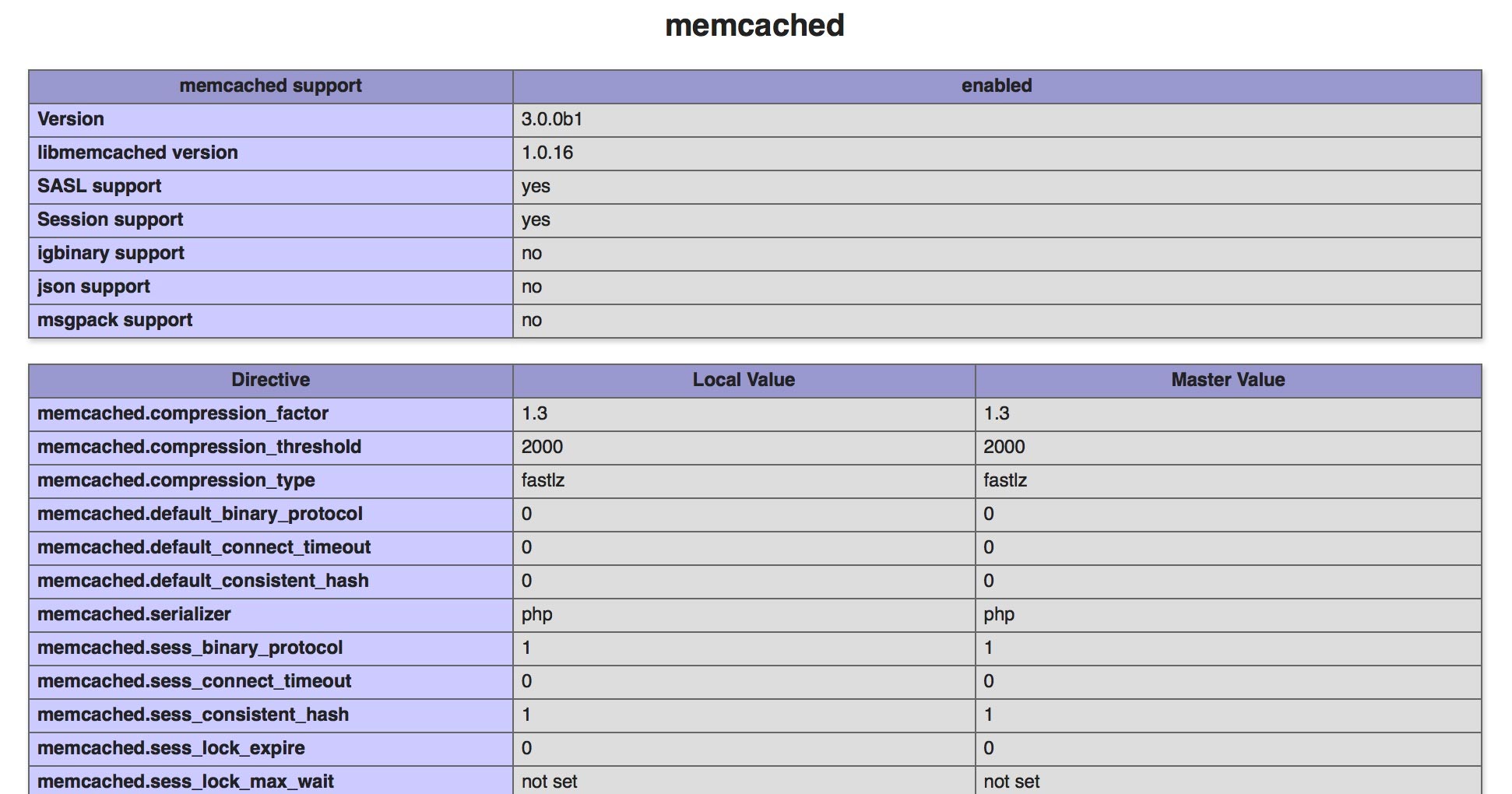
打开 phpinfo 页面,已经已经看到 memcached 扩展成功安装了。安装 memcache 扩展
同样尝试用 PECL 来安装:
但同样失败/tmp/pear/temp/memcache/memcache.c:40:40: fatal error: ext/standard/php_smart_str.h: No such file or directory
#include "ext/standard/php_smart_str.h"
compilation terminated.
make: *** [memcache.lo] Error 1
ERROR: `make' failed
貌似原因也是 PECL 还不支持在 PHP7 下安装 memcache 扩展,
https://pecl.php.net/package/memcache
2013年以来为更新过。此路不通只能另想办法,同样是到 github 上碰碰运气。搜索 pecl memcache
https://github.com/search?utf8=%E2%9C%93&q=pecl+memcache&type=Repositories&ref=searchresults
https://github.com/websupport-sk/pecl-memcache.git
其中第一个(https://github.com/websupport-sk/pecl-memcache)就是想要的,并且代码已经支持到 PHP7,立即下载代码编译:
用 phpize 安装,步骤和 memcached 一模一样
类似 memcached , 将 memcache.so 在 php.ini 中引入
加入:extension=memcache.so
最后 reload php-fpm
大功告成,可以在 phpinfo 页面看到 memcahce 和 memchaced 都已经成功安装安装 Memcached 内存缓存服务器
Centos 下可以用 yum 进行安装
再启动 Memcached 就可以测试 PHP 扩展了
默认端口是 11211